eobdtool

eobdtool
Welcome to eobdtool.co.uk
显示标签为“OP-COM V2012”的博文。显示所有博文

2017年5月17日星期三

OPCOM OP-COM reset and reprogram ECU guide for Vauxhall Astra H

This is guide about using OP-COM to reset and reprogram Vauxhall Astra H 2004 ECU immobilizer. Get cheap OPCOM V2012 under $20 and you can start to diagnose and program Opel or Vauxhall Vectra-C, Astra-H, Zafira-B…
First, connect OPCOM with car and laptop. Open OPCOM software. Choose “2014”→“Astra-H”→ “Engine”→ “Z 16 XEP”
Follow the tip and click “Next”
Then, choose “Reset ECU” and you need to enter security code. Enter then click OK.

Wait and it will show “Reset completed successfully”
Now car’s immobilizer light is blink. Choose “Body”→ “Programming”→ “Immobilizer Programming”
Click “Security Code” and enter security code. Click “Program Immobilizer Function”, choose “ECM” option and click “Do It”.
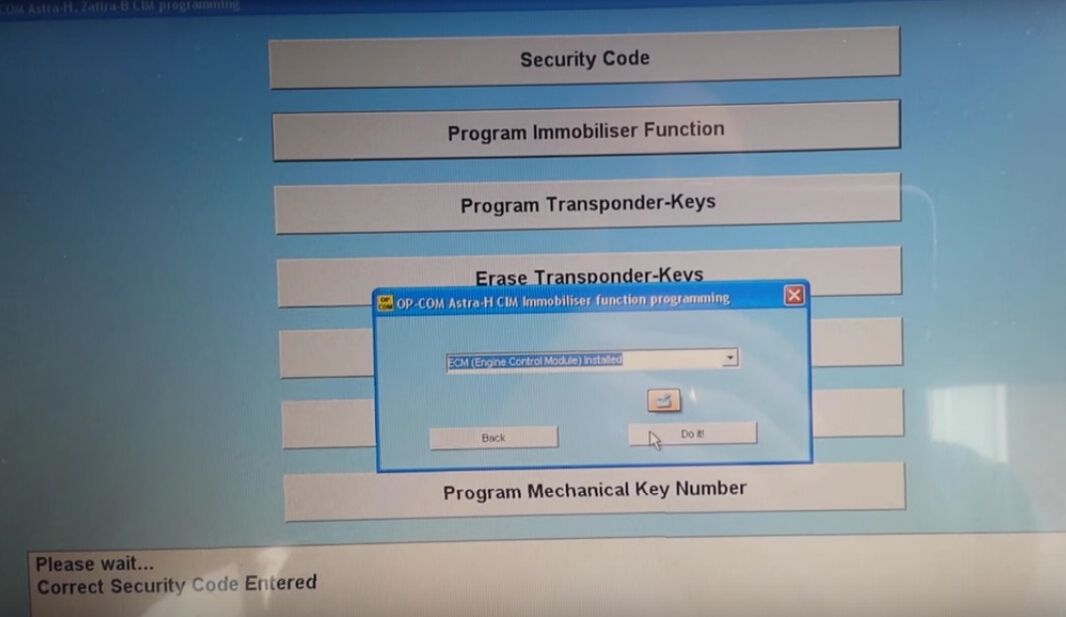
Turn to main menu and choose “Fault Codes”. OPCOM software will display fault codes.
Click “Clear Fault Codes” and the code “P1614-50 Wrong Transponder Key” still exist. Then you need to remove key and plug it in again. Now all codes are cleared and car’s immobilizer light is off.
Now all things done! OPCOM diagnostic tool reset Vauxhall Astra H 2004 ECU immobilizer successfully.

2016年3月10日星期四

How to update Opcom Clone Firmware 1.45 to 1.60

This post is aimed to help update OPCOM China clone 2012V 12039a Can OBD2 For Opel FW 1.45 to 1.60 version. Hope this helps.

(NOTE: update at risk for update method and files is offered by a opcom user)

 op com firmware 1.60


1. disable internet connection2. install driver for op-com 1.45 from op-com 08.2010 driver cd in device manager i see op-com v2.0
3. then install VAUX-COM_120309a+131223d_GB+OcFlash China.exe4. open OCFLASH FW UPG and load fw160.hex file
5. in oc flash - flashing mode is automatic
6
. press flash and wait about 1 minute flashing is finished7. after ocflash , use Mprog FTDI flash utiliy to change the FTDI 232R eeprom content . it should be seems that "USB Serial to converter" rather than "Opcom usb v2" interface . (you need to find the .ept file for ft232r ic)8. next, install the FTDI drivers supplied with "VAUX-COM_120309a+131223d_GB+OcFlash China.exe package.9. lastly if you 're lucky, opcom interface should be works

(Ftdi chip with program called mprog)

attached pictures with model opcom fw 1.45 motherboard with pic18f458


* easy method to get op-com fw 1.59


op-com_china clone.ept -> the old version software
op-com_new_vauxcom2012.ept -> new version software


2015年9月8日星期二

OP-COM opcom 2012V firmware 1.59 installation step-by-step

OP COM USB diagnostic interface for Opel and Vauxhall firmware has newly updated to V1.59. Here is the step-by-step instruction on how to install opcom China Clone software.

Software version (SW): 08/2010
Firmware version (FW): V1.59

How to install OP-COM 1.59 software?

1)    Install Op-com driver

Open My Computer
Open OP-COM (E:) CD software
Create a new folder “op-com” on Local Disk (C:)
Copy all files in OP-COM CD to the “op-com” folder

Send OP-COM Diagnostic software to Desktop (create shortcut)
Connect China clone OP-COM V1.59 interface with computer via USB port
Wait the system to detect hardware wizard
Select “Install from a list or specific location (Advanced)”, click “Next

Include and browse location to C:op-comDrivers, click OK

Click “Next”
Click “Next”
Click “Finish” when opcom driver is completely installed

Open My Computer>>Manager>>Device Manager>>Universal Serial Bus controllers>>USB Serial Converter to make sure well communication is built


2) Run Op-com software and diagnose

Plug the op-com cable with vehicle via OBD diagnostic socket
Open “Shortcut to OP-COM” software on desktop
OPCOM CHINA-CLONE 08/2010
Click “Settings

Click “Test Interface”, you will able to see the OPCOM serial number and firmware version V01.59
Click “Close”


Click “Save Config
OP-COM Configuration saved! Press “OK”

Back to Opcom software main menu
Select “Diagnostic” function
Select “Automatic Vehicle Identification

Select “KWP-2000” (K-line) or “CAN” and select diagnostic connector


The op-com 2010V software will display vehicle information, VIN, model, engine code etc


Click “Diagnose ECM” button
Select ECM type and diagnostic connector
Click “Fault Code”
Op-com will display all error codes stored in ECM

The click “Clear Fault Codes” to erase error codes
Perform other diagnostic functions or exit the software program
Unplug the op-com USB interface.